Start here
Kinproof answers one question before a policy drives a robot: does this policy agree with this exact robot? Everything below follows one loop.
The examples use Asimov 1. Set the path once:
$ A1=third_party/asimov-1/sim-model/asimov_1_25dof/xml/asimov_1_25dof.xml1. Bring your robot
Kinproof reads a MuJoCo (MJCF) model: joint names, ranges, axes, torque limits, passive springs and meshes. Asimov 0 and Asimov 1 are fetched for you at pinned commits, and Unitree G1, Unitree H1 and Booster T1 ship with the repo. For any other robot, point --robot at its XML. A URDF can be compiled to MJCF with MuJoCo first.
$ ./scripts/fetch_asimov_model.sh 43aa368 # any Asimov commit$ kinproof check --robot path/to/your_robot.xml --policy my.card.yaml# URDF to MJCF with MuJoCo$ python - <<'EOF'import mujocomodel = mujoco.MjModel.from_xml_path("robot.urdf")mujoco.mj_saveLastXML("robot.xml", model)EOF
1.1Choose your robot
MuJoCo is the physics simulator, and MJCF is its robot file format. Every robot below is an MJCF file. MuJoCo Menagerie is Google DeepMind's public collection of those files, which is where Unitree G1, Unitree H1 and Booster T1 come from. Pick one to see it, how to get it and how to check it.
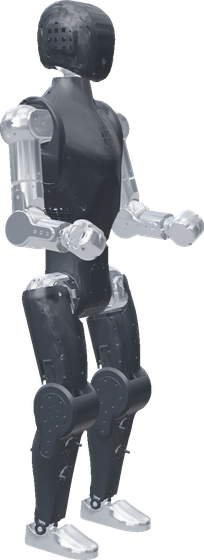
Asimov 1
The reference robot. Its models are public and change often, which is why most demos use it.
History, links and sources
Asimov is the open-source humanoid from Menlo Research, an AI lab based in Singapore. The team built the legs first, published as Asimov 0, then the full-body Asimov 1: about 1.2 m tall and 35 kg, with 25 actuated joints and two passive toe joints. Menlo publishes the mechanical CAD, electronics, simulation models, firmware and walking policy, and presents Asimov as an open reference design for builders and researchers rather than a finished consumer product.
Why it is here. Its models are public and change often, which makes it the clearest robot on which to show model drift.
Sources- Asimov 1 overviewMenlo Research documentation
- Asimov V1 open-sources humanoid robotics developmentOpen Source For You, May 2026
- Menlo Research unveils a DIY kit of its open-source humanoidInteresting Engineering, 2026
$ ./scripts/fetch_demo_models.sh # Asimov 1 @43aa368, Asimov 1 @35ae7b3, Asimov 0$ A1=third_party/asimov-1/sim-model/asimov_1_25dof/xml/asimov_1_25dof.xml$ kinproof init --robot $A1 --name my-walk --out my-walk.card.yaml$ kinproof check --robot $A1 --policy my-walk.card.yaml
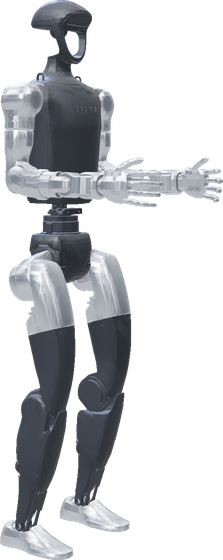
Unitree G1
Unitree's own G1 walking policy, imported from unitree_rl_gym. Checked against the Menagerie G1, nothing blocks; two items wait for a person.
History, links and sources
Unitree Robotics, founded in Hangzhou in 2016 and long known for its four-legged robots, unveiled the G1 at the ICRA 2024 conference in Yokohama in May 2024, at a base price of US$16,000, a fraction of its larger H1. It stands about 1.32 m tall, weighs about 35 kg, and was aimed first at researchers and developers. The Menagerie model used here has 29 joints, including the waist and both wrists.
Why it is here. Unitree publishes the G1's walking policy together with its training and deployment configs in unitree_rl_gym, so Kinproof checks the policy Unitree actually trained, not a card written for the demo.
Sources- Unitree Robotics unveils G1 humanoid for $16kThe Robot Report, 15 May 2024
- Humanoid robot Unitree G1 costs 16,000 dollarsheise online, May 2024
$ T=examples/training/unitree_rl_gym$ kinproof import --config $T/legged_gym/envs/g1/g1_config.py \ --deploy $T/deploy/deploy_mujoco/configs/g1.yaml --out g1.card.yaml$ kinproof check --robot examples/robots/unitree_g1.xml --policy g1.card.yaml --sources $TVerdict: NEEDS_COUNTERSIGN (trained on another model; actions can reach past the hard stops)
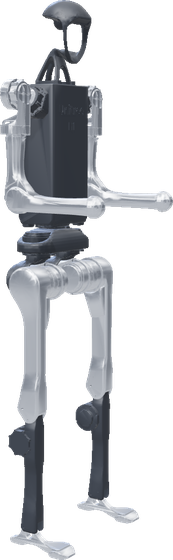
Unitree H1
Unitree's own H1 walking policy. Its joint names differ from the Menagerie H1, so a person must confirm the mapping.
History, links and sources
The H1 is Unitree's first full-size, general-purpose humanoid, released in August 2023 about six months after the project began. It stands about 1.8 m tall and weighs about 47 kg. In March 2024 Unitree published a video of the H1 walking at 3.3 m/s, which it described as a speed record for a full-size humanoid. The Menagerie model has 19 joints.
Why it is here. Unitree's own H1 policy from unitree_rl_gym names its joints differently from the Menagerie H1, which shows how Kinproof handles a name mapping it can propose but not prove.
Sources- Unitree H1 humanoid breaks world speed record and tackles stairsNew Atlas, March 2024
- Chinese scientists build world's fastest humanoid robotLive Science, March 2024
$ kinproof check --robot examples/robots/unitree_h1.xml \ --policy examples/policies/unitree_h1.card.yaml # imported from unitree_rl_gym ? COUNTERSIGN C02-MAP:proposed 10 names differ, e.g. left_knee_joint → left_kneeVerdict: NEEDS_COUNTERSIGN
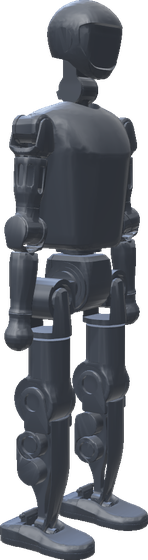
Booster T1
Booster's own T1 walking policy, imported with its deployment config. It was trained with more ankle torque than the Menagerie T1 allows.
History, links and sources
Booster Robotics, a Beijing start-up, designed the T1 as a platform for developers: about 1.2 m tall and 30 kg, with 23 joints in its standard build (head, waist, four per arm and six per leg). Its founder describes it as light, agile and durable enough to survive hundreds of falls. The T1 is one of the standard platforms of the RoboCup Humanoid Soccer League, and Booster has open-sourced Booster Gym, its reinforcement-learning pipeline for humanoid walking.
Why it is here. Booster publishes the T1 policy's training config and its deployment config in booster_gym, so Kinproof can check the robot model, the training run and the deployment against each other.
Sources- China's science-tech sector maturing rapidly amid incentivesThe Star, 1 July 2025
- Booster Gym: an end-to-end reinforcement learning framework for humanoid locomotionarXiv:2506.15132, June 2025
- Team Robo-Erectus: RoboCup 2026 Humanoid Soccer League team descriptionRoboCup Humanoid League, 2026
$ kinproof check --robot examples/robots/booster_t1.xml \ --policy examples/policies/booster_t1.card.yaml # imported from booster_gym ✗ BLOCK C05-EFFORT:Left_Ankle_Pitch 24 N·m cap; the robot allows 20 N·m ? COUNTERSIGN C11-DEPLOY:filter deployment filters targets; training did notVerdict: BLOCKED
Where the models come from: MuJoCo and MuJoCo Menagerie
MuJoCo (Multi-Joint dynamics with Contact) is the physics engine whose MJCF format every robot here is written in. It was created by Emo Todorov and sold commercially by Roboti from 2015 to 2021. Google DeepMind acquired it in October 2021 and finished open-sourcing it in May 2022 under the Apache 2.0 licence.
MuJoCo Menagerie is Google DeepMind's curated collection of high-quality MuJoCo models of real robots, started in 2022. The Unitree G1, Unitree H1 and Booster T1 models in Kinproof come from it, unmodified, at a pinned commit. Asimov's models come straight from Menlo Research.
Sources- Open-sourcing MuJoCoGoogle DeepMind blog, 23 May 2022
- DeepMind's open-source version of MuJoCo available on GitHubThe Robot Report, 25 May 2022
- MuJoCo Menagerie: a collection of high-quality simulation models for MuJoCoGoogle DeepMind on GitHub, 2022
1.2Check a file in the browser
No install needed: the Try it page runs the same checks as kinproof check on files you upload. Nothing is stored; the files are read, checked and forgotten.
- Robot model (.xml), required. One self-contained MuJoCo MJCF file up to 2 MB, without
<include>. It needs a<joint>with arangefor every joint the policy drives; torque limits (actuatorfrcrange, orforcerangeor a motor'sctrlrangein<actuator>) turn on the torque checks. A URDF has to be compiled to MJCF first (see the URDF tab on the overview). - Policy card (.yaml), optional. The policy's contract: joint order, default pose, action scale and clip, gains, torque caps and command range. Leave it out and Kinproof writes a card from the model and marks every generated field for a countersign.
- Policy name. Only used to label the result.
- Run the preflight. You get the verdict (Blocked, Needs countersign or Cleared for sim), the counts, every finding with a plain explanation, the card that was checked (ready to download) and the seal digest.
The browser check covers the contract. Calibration files, model drift, countersigning and the sealed 3D report need the CLI, described in the steps below.
2. Describe your policy
A policy card is a short YAML file that writes down what a checkpoint assumes. If the policy was trained with legged_gym or booster_gym, import the card from the training config (2.1). Otherwise generate one from the model, then replace each value marked for review with what training actually used. If the card does not say something, Kinproof treats it as unknown, never as fine.
$ kinproof init --robot $A1 --name my-walk --out my-walk.card.yamlname: my-walkrobot: asimov_1_25dofrobot_commit: 43aa368 # model commit used in trainingcontrol_hz: 50action: type: position_offset # target = default_pose + scale * clip(action) scale: 0.25 clip: 0.4 filter_alpha: 0.7 # null = no filter; missing = unknown joints: [left_hip_pitch_joint, left_hip_roll_joint, ...]default_pose: {{left_knee_joint: 0.4, right_knee_joint: -0.4, ...}}pd: {{kp: {{"*": 40}}, kd: {{"*": 2}}}}effort_limits: {{left_knee_joint: 45, ...}}command_limits: {{vx: [-0.3, 0.6], vy: [-0.2, 0.2], yaw_rate: [-0.8, 0.8]}}
2.1Import from the training config
A card you type by hand only proves that the card matches the robot. kinproof import reads the files the policy was actually trained and deployed with, so every value points back to a file and a line. It reads two formats today:
- legged_gym, as used by Unitree's unitree_rl_gym: the
<robot>_config.pyclass, with defaults fromlegged_robot_config.py. The file is parsed, never executed. - booster_gym, Booster Robotics' training pipeline:
envs/<robot>.yaml.
The robot file comes from the config itself: asset.file, the URDF the trainer loaded, which gives the joint order (Isaac Gym's depth-first order) and the torque caps the trainer clipped to. --model overrides it. --deploy adds the deployment config, and check C11 compares it with training: a different rate, action scale or default pose blocks, and different gains, torque caps or filters wait for a countersign.
$ T=examples/training/unitree_rl_gym$ kinproof import --config $T/legged_gym/envs/g1/g1_config.py \ --deploy $T/deploy/deploy_mujoco/configs/g1.yaml --out g1.card.yamlWrote g1.card.yaml: 12 action joints, 18 traced fields from unitreerobotics/unitree_rl_gym @276801e, plus its deployment config.$ kinproof check --robot examples/robots/unitree_g1.xml --policy g1.card.yaml --sources $T ✓ PASS C10-CARD:imported every source file matches its recorded SHA-256 and every cited line exists ✓ PASS C11-DEPLOY:gains PD gains in deployment match trainingVerdict: NEEDS_COUNTERSIGN
Without --sources, C10 reports the provenance as declared, not verified. With it, Kinproof checks three things: every cited file matches its recorded SHA-256, every cited line exists, and re-importing the files gives the same value and the same file:line for every field. Only all three pass; a mismatch waits for a countersign.
provenance: default_pose: legged_gym/envs/g1/g1_config.py:6 pd.kp: legged_gym/envs/g1/g1_config.py:42 action.clip: legged_gym/envs/base/legged_robot_config.py:135 effort_limits: resources/robots/g1_description/g1_12dof.urdf (joint effort limits; legged_gym clips torques to them) deploy.kp: deploy/deploy_mujoco/configs/g1.yaml:12
The repo keeps unmodified copies of these upstream files in examples/training/, including the published checkpoints, with their licences and the exact commit, so the demos and the rollout run offline. Meshes stay upstream.
3. Run a check
Point Kinproof at the robot model and the card. A calibration file is optional. The run prints every finding, writes a sealed JSON report and a 3D HTML report next to it.
$ kinproof check --robot $A1 --policy examples/policies/demo_community_walk.card.yaml \ --calibration examples/calibration/asimov_0017_calibration.csv --out out/community.json ✗ BLOCK C03-POSE:r_knee +0.40 rad is outside right_knee_joint [-1.50, 0.00] ✗ BLOCK C05-EFFORT:r_knee trained at 60 N·m, the robot allows 45 N·mVerdict: BLOCKED
3.1Run the policy in MuJoCo
The checks say whether the card agrees with the robot. --rollout runs the checkpoint itself: Kinproof builds each observation the way the policy's own deployment script does (the card's observation block, written by kinproof import), drives the joints with the card's gains and torque caps, and counts falls over several trials. TorchScript actors from legged_gym and booster_gym run in numpy, so PyTorch is not needed; .onnx files run with ONNX Runtime. It needs MuJoCo (pip install kinproof[sim]); without it the rollout waits for a countersign, never a pass.
$ pip install "kinproof[sim]"$ kinproof check --robot third_party/mujoco_menagerie/unitree_g1/g1.xml \ --policy examples/policies/unitree_g1.card.yaml \ --rollout examples/training/unitree_rl_gym/deploy/pre_train/g1/motion.pt --out out/g1.json# S02-ROLLOUT: falls out of 5 trials, seconds upright and distance walked, sealed in the report
- All trials fall: Blocked. The policy cannot keep this robot up in simulation.
- Some fall: Needs countersign. A person decides whether that is acceptable.
- None fall: passes, with time upright, distance against the command, time at a hard stop and time at the torque cap.
Joints the policy does not drive are held at the model's start pose. Position servos in the model are replaced by torque motors, so the card's gains, not the model's, move the joints. The checkpoint's hash is sealed with the other inputs. CI runs the rollouts of Unitree's and Booster's published policies on every push: on each maker's own deployment model as a positive control, which must stay up, move the commanded way and track the commanded speed, and on the Menagerie models, where the results are informational. It is limited simulation evidence, not a policy-performance benchmark.
4. Read the 3D report
Open out/community.html. The robot stands in the pose your card asks for. Hover a part to read its range, pose and torque, click it to zoom, and use the filters to move through the findings.
5. Countersign
Fix every BLOCK first. Then accept what is only a guess, by id, with your name. The signature is chained to the exact findings, so it cannot be moved to a different report.
$ kinproof check --robot $A1 --policy examples/policies/demo_community_walk_fixed.card.yaml \ --calibration examples/calibration/asimov_0017_calibration.csv --out out/fixed.jsonVerdict: NEEDS_COUNTERSIGN$ kinproof sign out/fixed.json --by "Your Name" --accept C02-MAP:proposed C09-CALIB:mappingCountersigned by Your Name: C02-MAP:proposed, C09-CALIB:mapping
5.1Sign with your SSH key
A typed name says who claims to have signed. An SSH signature proves who held the key. Add --ssh-key and Kinproof signs the countersignature record in the standard SSHSIG format, the same one ssh-keygen -Y sign and Git's SSH commit signing use. GitHub publishes every account's SSH keys at github.com/<login>.keys, so kinproof verify --github confirms the key belongs to the account the record names.
$ kinproof sign out/fixed.json --by "Your Name" --accept C02-MAP:proposed C09-CALIB:mapping \ --ssh-key ~/.ssh/id_ed25519 --github your-loginSigned with ssh-ed25519 SHA256:… for GitHub @your-login$ kinproof verify out/fixed.json --github #1 SSH signature valid: ssh-ed25519 SHA256:… · GitHub @your-login (key confirmed on the account)
Ed25519 and RSA keys (2048 bits or more) are supported, and verification needs nothing but Python. --github proves the key is on the account today, not that it was when the record was signed. With OpenSSH installed, signing goes through ssh-keygen, so ssh-agent and passphrases work. The Rust verifier confirms the signature bytes are sealed in the chain; the Python verifier checks the signature itself.
6. Verify
Anyone can re-check a report: the digest, the signature chain and the hash of every input file. The Rust verifier is a separate implementation with zero dependencies, so the two must agree.
$ kinproof verify out/fixed.jsonVerified: digest intact, 1 countersignature(s) chained, inputs unchanged.Chain head 5f0c… (keep it; verify --head catches signatures removed later)$ ./verifier/target/release/kinproof-verify out/fixed.json --head 5f0c…Verified (Rust): digest intact, 1 countersignature(s) chained, inputs unchanged.
A chain proves nothing inside it changed, but a chain with its last signature cut off is still a valid chain. Keep the head that verify prints, in the pull request or a ticket, and pass it back with --head: both verifiers then fail if any signature after it is missing.
Model drift
Robot models change. Re-check a policy against two revisions and Kinproof lists every joint that changed and every finding that is new on the new model, with the cause.
$ kinproof drift --from "third_party/asimov-1@35ae7b3/sim-model/xmls/asimov_1.xml" --to $A1 \ --policy examples/policies/demo_september_walk.card.yaml
Talk to your robot
Give an instruction in Indonesian or English. Steps outside the policy's trained command range get a slower proposal that needs a countersign. Steps the planner cannot parse get a question, never a guess. You can also try it live on the Connections page.
$ kinproof plan "jalan pelan ke depan 2 meter lalu belok kiri" --robot $A1 \ --policy examples/policies/demo_clean_walk.card.yaml$ kinproof plan "walk to the door, about three metres" --llm --robot $A1 \ --policy examples/policies/demo_clean_walk.card.yaml
Commands
| Command | What it does |
|---|---|
kinproof import | Build a policy card from a legged_gym or booster_gym training config, with the file and line of every value. Add --deploy to check the deployment config against training. |
kinproof init | Write a policy-card skeleton from a robot model. Unknown values are marked for review. |
kinproof check | Check a policy card, and an optional calibration file, against the robot model. Writes a sealed JSON and a 3D report. Add --rollout CHECKPOINT to run the policy itself in MuJoCo. |
kinproof drift | Compare two model revisions and re-check a policy on both. |
kinproof sign | Countersign specific findings by id. Blocks are refused. Add --ssh-key and --github to sign the record with your SSH key. |
kinproof verify | Re-derive the digest, walk the signature chain, check SSH signatures and re-hash every input. Add --github to confirm each key is on its GitHub account. |
kinproof export | Write a sealed report as SARIF for code scanning, Markdown for a pull request, or JUnit XML. |
kinproof plan | Turn an instruction (Indonesian or English) into a checked motion plan. Add --llm to use Nebius. |
kinproof render | Re-render the 3D view of a sealed report. Add --embed for a single file. |
kinproof models | List the Nebius models your key can use. |
kinproof doctor | Check the Nebius and Tavily connections. |
Severities and exit codes
| Severity | Meaning |
|---|---|
| BLOCK | Must not run. Fix the card, the policy or the robot. Cannot be countersigned. |
| COUNTERSIGN | Plausible but unproven. Runs only after a named person accepts this exact finding. |
| WARN | Worth reading. Does not gate. |
| PASS | Checked and held. |
| SKIPPED | Not checked. Never counted as a pass. |
0 cleared or verified, 1 blocked or verification failed, 2 waiting for a countersign. Cleared for simulation is not cleared for hardware.Use it in CI
Every command returns a meaningful exit code, so a policy can be gated in a pull request like any other test. The repository is also a GitHub Action: it runs the check, writes the verdict to the job summary, comments it on the pull request (editing its own marked comment on reruns, never stacking new ones), uploads the findings to code scanning as SARIF with each one on the card line that names its joint, and keeps the sealed report as an artifact.
# .github/workflows/policy.ymlpermissions: {contents: read, security-events: write, pull-requests: write}jobs: kinproof: runs-on: ubuntu-latest steps: - uses: actions/checkout@v4 - uses: wiqilee/kinproof@main with: robot: robots/my_robot.xml policy: policies/walk.card.yaml checkpoint: policies/walk.pt # optional: run the policy in MuJoCo too fail-on: blocked # or countersign, or never
The same views are available from the CLI with kinproof export:
$ kinproof export out/walk.json --format markdown --link https://example.org/walk.html$ kinproof export out/walk.json --format sarif --out walk.sarif # GitHub code scanning$ kinproof export out/walk.json --format junit --out walk.xml # any CI test report
Nebius and Tavily keys
Both are optional. Nebius translates free language into plan steps; Tavily attaches public context to a report (kinproof check --evidence) and, when a visitor ticks the box on Try it, to an uploaded robot. Neither can change a finding or a verdict. Copy .env.example to .env.local, paste your keys, and check them with kinproof doctor. On Vercel, add the same names under Settings, Environment Variables.
$ cp .env.example .env.local # .env.local is ignored by git$ kinproof doctor
NEBIUS_API_KEY=your-nebius-keyNEBIUS_MODEL_ID=model-id-from-kinproof-modelsTAVILY_API_KEY=your-tavily-key